
Choose the Rode PodMic if: You already have or are buying an audio interface, and you want the better-sounding mic for less money. The PodMic at $99 plus a Focusrite Scarlett Solo at $119 gives you a better signal chain than the MV7 at $249.
Choose the Shure MV7 if: You want one cable into your computer with no interface, no extra boxes, and no configuration. The MV7’s USB mode is genuinely good, and the convenience is real.
| Mic | Price | Connection | Interface Required | Our Score |
|---|---|---|---|---|
| Shure MV7 | $249 | USB + XLR | No | 8.8 |
| Rode PodMic | $99 | XLR only | Yes | 9.2 |
Full Breakdown

- USB and XLR outputs — no interface required, upgradeable later
- Built-in headphone monitoring jack directly on the mic body
- Touch panel controls for gain and headphone volume
- Warm, broadcast-style sound that flatters most speaking voices
- Strong build quality — feels like a professional studio microphone
- At $249, a significant premium for USB convenience
- Built-in USB preamp is good but not as clean as a dedicated interface
- Touch panel controls are imprecise in practice
- Heavier than the PodMic — needs a solid boom arm or desk stand
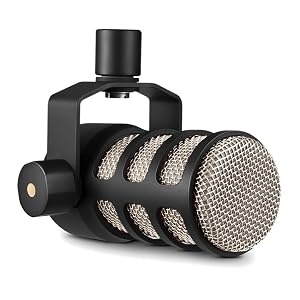
- Internal pop filter — position close without plosive problems
- Tight cardioid pattern rejects off-axis room noise effectively
- Heavy all-metal build — vibration resistant and built to last
- Sounds noticeably better than the MV7 when paired with a quality preamp
- At $99, leaves plenty of budget for a solid interface
- XLR only — requires an interface and cable to use
- No headphone monitoring on the mic — comes from the interface instead
- Less convenient starting point for absolute beginners
- Gain-hungry — needs a decent preamp to sound its best
The System View: Total Cost Comparison
| Setup | Total Cost | Audio Quality | Complexity |
|---|---|---|---|
| MV7 (USB) | $249 | Good | Minimal |
| PodMic + Scarlett Solo | $218 | Better | Low |
| PodMic + Scarlett 2i2 | $268 | Better | Low |
- Recording in locations where carrying an interface is impractical
- You want to start recording immediately with no configuration
- You plan to move to XLR later and want the mic to remain
- Setting up a permanent desk recording space
- You already have or are buying an interface for any reason
- You want the best possible audio quality at this price point
Should You Wait for the SM7B Instead?
Both the MV7 and PodMic are frequently compared to the Shure SM7B ($399), which is the aspirational podcasting microphone. The SM7B requires significantly more gain — you will likely need a CloudLifter or a high-gain interface to drive it cleanly. Total system cost is $550 or more.
The SM7B sounds better than both the MV7 and PodMic in a well-controlled environment, but the gap is smaller than the price difference suggests. For most home podcasters in imperfect rooms, the PodMic with a good interface sounds close enough that the SM7B is a want, not a need.
Buying Guide
Understanding the Real Cost Difference
The MV7’s $249 price point looks expensive compared to the PodMic’s $99, but comparing them as standalone mics misses the point. The MV7 includes its own USB audio interface. The PodMic does not. A fair comparison puts the PodMic at $218 all-in with a Scarlett Solo, or $268 with a Scarlett 2i2 that adds a second mic input and a better headphone amp. At roughly equal spend, the interface-based system wins on audio quality. The MV7 wins on simplicity. Neither choice is wrong — they are solving different problems.
XLR vs USB: Which Setup Makes Sense for You
USB makes sense if you record at a desk, move your laptop around, do video calls where you need the mic without extra gear, or are starting out and want to minimise setup complexity. XLR makes sense if you have a dedicated recording space, are serious about sound quality, might want to add a second mic for in-person guests, or want control over your gain and monitoring that a USB mic’s built-in preamp cannot provide. The MV7 hedges this decision — USB now, XLR later. That flexibility is worth something, even if you pay a premium for it.
Frequently Asked Questions
Does the MV7 sound as good as the PodMic?
In USB mode, no. The PodMic paired with a quality interface sounds cleaner and has better gain headroom. In XLR mode through the same interface, the gap is smaller and comes down to personal preference — the MV7 is warmer and slightly more bass-heavy, while the PodMic is more neutral and focused.
Do I need a CloudLifter with either mic?
No. Both the MV7 and PodMic are less gain-hungry than the SM7B and drive cleanly from a Focusrite Scarlett Solo or 2i2 without a CloudLifter. You only need one if your interface’s preamp cannot provide enough clean gain at higher output levels.
Can I start with the MV7 via USB and switch to XLR later?
Yes. The MV7 has both outputs, so you can use USB now and switch to XLR without replacing the mic. The XLR output sounds slightly better than the USB output when paired with a quality preamp, so upgrading to an interface later is a genuine improvement rather than a lateral move.
Is the MV7 worth it compared to the SM7B?
They are solving different problems. The MV7 is more versatile (USB and XLR), easier to set up, and significantly less gain-hungry. The SM7B sounds better in a controlled environment but costs $399 and needs a strong preamp to perform correctly. For home podcasting in an imperfect room, the MV7 or PodMic with an interface is the more practical choice for most people.
Related Guides
- Shure MV7 vs SM7B: Which Mic Is Actually Worth the Price Jump?
- Rode PodMic vs Shure SM7B: Which Mic Is Actually Worth It?
- Shure SM7B Review: Is It Worth It for Podcasting?
- Best XLR Microphone for Podcasting: Top Picks for Every Budget
Browse all guides in our Microphones Hub.
Related reading: Focusrite Scarlett Solo Review: The Interface • Rode Wireless GO II Review: Best Wireless Mic • Focusrite Scarlett 2i2 Review: Still the Best