
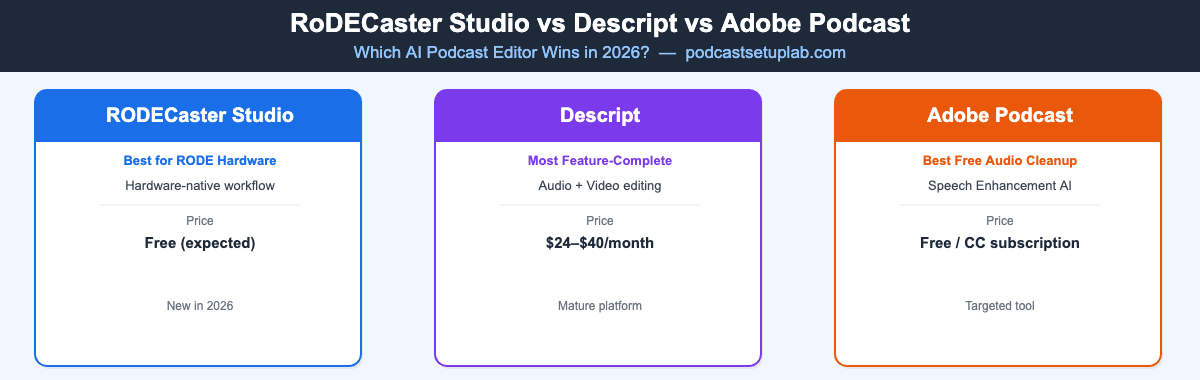
Quick Verdict
What Each Tool Actually Does
RØDECaster Studio
RØDECaster Studio is a desktop application built around spoken-word content. Core workflow: import audio from your RØDECaster hardware (or any audio file), use the transcript to edit by cutting text rather than waveforms, apply AI filler-word removal, and export directly to podcast platforms.
Key Features Announced at NAB 2026
- —Transcript-based audio editing — edit audio by deleting words in the transcript
- —AI filler-word removal (um, uh, false starts)
- —RØDE Assistant — natural language commands (“remove the first 30 seconds,” “tighten up the intro”)
- —Studio-grade transcription with speaker identification
- —One-click export to Spotify for Podcasters, Apple Podcasts, YouTube
- —Deep integration with RØDECaster Pro II and Duo hardware
Not at launch: Video editing, multi-camera sync, screen recording, or software-based audio enhancement beyond the hardware chain.
Descript
Descript is the most feature-complete AI podcast and video editor available in 2026. The core interface works the same way as RØDECaster Studio — edit audio by editing the transcript — but Descript layers on video editing, screen recording, multitrack support, and its Studio Sound AI audio enhancement. It covers the full production workflow from rough recording to published episode.
Key Features
- —Transcript-based editing for both audio and video
- —AI filler-word removal and silence compression
- —Studio Sound — AI noise reduction and EQ that polishes without over-processing
- —Overdub — synthetic voice cloning for seamless corrections without re-recording
- —Built-in screen recording
- —Multitrack support for multi-guest recordings
- —Collaboration tools for team workflows
- —Direct export to audio or video files and publishing integrations
Pricing: Free tier. Creator ~$24/month. Business ~$40/month. Learn more at descript.com.
Adobe Podcast
Adobe Podcast focuses on one thing and does it exceptionally well: improving the audio quality of existing recordings. Speech Enhancement takes noisy, low-quality recordings and processes them to sound like they were recorded in a treated studio. Studio Cleanup removes background noise, room echo, and inconsistencies between recording environments.
Key Features
- —Speech Enhancement — flagship AI audio cleanup (best-in-class at the free tier)
- —Studio Cleanup — reverb and background noise removal
- —Basic transcript editing
- —Mic Check — real-time recording quality feedback before you record
- —Part of Adobe Creative Cloud — included for existing CC subscribers
Pricing: Free tier available without CC subscription. Advanced features and usage limits require CC. Learn more at podcast.adobe.com.
RØDECaster Studio vs Descript vs Adobe Podcast: Head-to-Head
| Feature | RØDECaster Studio | Descript | Adobe Podcast |
|---|---|---|---|
| Transcript-based editing | Yes | Yes | Basic |
| AI filler-word removal | Yes | Yes | Limited |
| AI audio enhancement | Via hardware chain | Studio Sound | Speech Enhancement (best-in-class free) |
| Video editing | No | Yes | No |
| Natural language AI commands | Yes (RØDE Assistant) | Limited | No |
| Hardware integration | RØDECaster Pro II / Duo | None | None |
| Direct podcast publishing | Yes | Yes | No |
| Multitrack support | TBC at launch | Yes | No |
| Platform | Mac / Windows desktop | Web + desktop | Web-based |
| Price | TBC — check rode.com | Free–$40/month | Free–CC subscription |
AI Audio Quality: Who Sounds Better?
Adobe Podcast Speech Enhancement is the current benchmark for AI audio cleanup. Upload a recording made on a laptop mic in a noisy room and the output sounds like it was recorded in a treated studio. The processing is aggressive — occasionally over-processed — but for genuinely bad recordings, nothing else matches it at the free price point.
Descript Studio Sound is more balanced. It improves recordings without the over-processed quality that Adobe’s approach can introduce. For recordings already reasonably clean, Studio Sound adds polish without artifacts. It’s the better choice for audio that’s decent and needs refinement rather than rescue.
RØDECaster Studio approaches audio quality differently — it relies on the RØDECaster hardware signal chain to deliver clean audio before editing begins. AIRA processing, Aphex effects, and multitrack mixing happen at the hardware level. If you’re using a RØDECaster device, your recordings will already be cleaner than most software enhancement can achieve. The software’s job is editing and publishing, not audio rescue.
Which AI Podcast Editor Is Right for Your Workflow?
You own a RØDECaster Pro II or Duo
Use RØDECaster Studio. Native hardware integration and a purpose-built podcast workflow will save time over any third-party tool. The RØDE Assistant natural-language editing is worth testing once broadly available.
You produce audio-only podcasts and want powerful AI editing without hardware
Descript. The transcript editing, filler word removal, and Studio Sound combination covers the full editing workflow. The free tier is sufficient to evaluate whether it fits your process.
You have rough recordings to rescue
Adobe Podcast Speech Enhancement first, then edit in your DAW or import the cleaned audio into Descript. Adobe’s enhancement is the best single-step audio cleanup available at any price tier.
You produce video podcasts
Descript is the only tool of the three that handles video editing natively. For multi-camera or video-first productions, there’s no real competition here yet.
You’re an existing Adobe Creative Cloud subscriber
Adobe Podcast is worth trying at no additional cost. For a simple audio podcast, Speech Enhancement alone may cover your entire workflow.
The RØDECaster Studio vs Descript choice connects to your broader toolchain. If you’re also evaluating recording platforms alongside your editing software, see our full breakdown of Riverside vs Descript vs Squadcast — which covers the recording side of the workflow in more depth.
RØDECaster Studio vs Descript: Use-Case Breakdown
The RØDECaster Studio vs Descript comparison plays out differently depending on the type of podcast you produce. For a solo interview show recorded with a RØDECaster Pro II, RØDECaster Studio is almost certainly the right choice — the hardware handles signal processing, the software handles transcript editing and publishing, and the RØDE ecosystem is built around exactly that workflow.
For a multi-guest show recorded on different platforms, the RØDECaster Studio vs Descript comparison shifts. Descript’s multitrack import, collaborative editing tools, and video capabilities make it more suited to productions with remote guests, live shows with separate tracks, or teams where editors and hosts work in different locations.
A common workflow combining all three tools: record with Adobe Podcast Mic Check active for live feedback, run the raw files through Adobe Podcast Speech Enhancement for cleanup, then bring the cleaned audio into the RØDECaster Studio vs Descript tool of choice for transcript editing and publishing. This hybrid approach makes sense for podcasters without access to a RØDECaster device who still need professional-quality output.
The RØDECaster Studio vs Descript vs Adobe Podcast decision also depends on your existing subscription stack. If you’re already paying for Adobe Creative Cloud, Adobe Podcast costs nothing extra for the core features. If you’re committed to the RØDE hardware ecosystem, RØDECaster Studio eliminates a monthly subscription entirely. If you’re building a podcast-first production business and need everything in one place, Descript’s Creator plan at ~$24/month is the most efficient path.
One honest note on the RØDECaster Studio vs Descript comparison at this point in 2026: RØDECaster Studio is new. Descript has years of iteration behind it — the filler-word removal is more mature, the export pipeline more tested, and the edge cases better handled. RØDECaster Studio’s RØDE Assistant and hardware-native workflow represent a genuine competitive advantage, but expect the software to mature over the next 12 months in ways that will make the comparison evolve.
Should You Switch? A Practical RØDECaster Studio vs Descript Guide
The RØDECaster Studio vs Descript question is most relevant for podcasters who are currently using a DAW (like Adobe Audition, Logic Pro, or GarageBand) and want to move to a transcript-based editing workflow. Both tools offer that workflow, but they’re built for different starting points.
If your current recording chain runs through a RØDECaster Pro II or Duo, the RØDECaster Studio vs Descript comparison tilts toward RØDECaster Studio purely on integration. Your hardware already handles gain staging, EQ, compression, and routing — the software just needs to handle editing and publishing, which is exactly what RØDECaster Studio is built for.
If you’re hardware-agnostic — recording on an interface mic, a USB mic, or even a laptop microphone that needs cleanup — the RØDECaster Studio vs Descript comparison favors Descript. Studio Sound handles audio cleanup in-app, the transcript editor is mature, and the multitrack support handles any guest configuration.
Neither the RØDECaster Studio vs Descript comparison nor the Adobe Podcast comparison is purely about features — it’s about which tool removes friction from your actual production workflow. Test the free tier of Descript and the free Speech Enhancement from Adobe Podcast before committing to a paid plan.
Frequently Asked Questions
RØDECaster Studio vs Descript: Pricing and Value
When comparing RØDECaster Studio vs Descript for podcast editing, pricing is a significant factor. Descript runs from free to approximately $40/month depending on the plan. The free tier allows evaluation but limits export quality and minutes. The Creator plan at ~$24/month is the practical entry point for weekly podcasters who need Studio Sound and full export options.
RØDECaster Studio pricing has not been confirmed by RØDE as of NAB 2026. The expectation — based on how RØDEConnect was released — is that the software ships free with RØDECaster hardware. If that holds, the RØDECaster Studio vs Descript pricing comparison shifts dramatically: RØDECaster Studio would be $0 for existing hardware owners, versus $24-40/month for Descript’s full-featured tiers.
Adobe Podcast remains the most accessible entry point — Speech Enhancement is free with no subscription required. For podcasters on tight budgets who need audio cleanup but not full transcript editing, Adobe Podcast delivers outsized value at zero cost.
Final Thoughts: RØDECaster Studio vs Descript vs Adobe Podcast in 2026
The RØDECaster Studio vs Descript debate ultimately comes down to your existing setup. If you’re in the RØDE ecosystem, RØDECaster Studio is the natural fit — hardware-native workflow, no monthly subscription (likely), and a purpose-built interface that doesn’t ask you to be a video editor. The RØDE Assistant natural-language commands represent a genuine step forward in podcast editing UX.
If you’re hardware-agnostic and produce a mix of audio and video content, Descript remains the most capable choice. No other tool in this comparison handles the full stack — recording cleanup, transcript editing, video production, team collaboration, and direct publishing — in a single app. The learning curve pays off quickly for podcasters publishing more than twice a month.
For a deeper look at the hardware side of the RØDE ecosystem, see our RØDECaster Pro II review. And if you’re evaluating recording platforms alongside your editing workflow, our Riverside vs Descript vs Squadcast comparison covers the recording side in full.