
Remote podcast recording has a different set of problems than in-person recording. Each person controls their own environment, their own microphone, and their own signal chain — independently. The platform you use to connect and record needs to handle track separation automatically, because you cannot mix two people’s audio together in real time and fix it later.
Quick Verdict
The remote recording setup: Riverside.fm as your recording platform, Samson Q2U microphone for each participant (USB plug-and-play, no interface required), and closed-back headphones — non-negotiable for every person on the call.
The most common mistake: Recording on Zoom. Zoom compresses audio for real-time transmission and mixes all tracks together. Riverside.fm records each person locally at full quality and keeps tracks separate — that difference cannot be fixed in post-production.
Quick Picks
Best recording platform: Riverside.fm — local track recording, separate files per person, video + audio
Best mic for remote guests: Samson Q2U — USB plug-and-play, no interface or setup required
Best headphones for remote recording: Sony MDR-7506 — closed-back, prevents echo, flat monitoring
Why headphones matter: Any participant monitoring through speakers creates echo on your track — it cannot be removed in post
How to Record a Podcast Remotely: Full Breakdown
Recording Platform
Rv
Riverside.fm
Browser-based recording platform — local tracks, separate files, no compression
Pros
- Records each person’s audio locally on their own device — uncompressed, regardless of internet quality
- Delivers separate audio tracks per participant — no mixed-together call recording
- Video recording up to 4K per person, synchronized with audio
- Progressive upload means no data loss if a connection drops mid-recording
- No software install for guests — they join via a browser link
Cons
- Free tier is limited to 2 hours per month — regular use requires a paid plan
- Requires a stable enough connection to upload the local recording after the session
Bottom line: Riverside.fm solves the core problem of remote podcast recording: it doesn’t record the call, it records each person’s microphone locally. The audio quality is determined by each person’s microphone and environment — not by their internet speed. That’s the only way to produce professional remote podcast audio.
Microphone
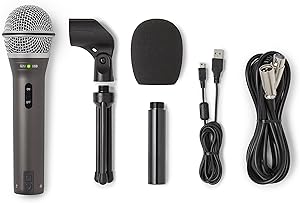
Samson Q2U
USB/XLR dynamic mic under $70 — the right mic for remote hosts and guests
Pros
- USB plug-and-play — guests connect directly to their computer with no interface or additional hardware
- Dynamic capsule naturally rejects background noise, room reflections, and HVAC — ideal for untreated home environments
- Built-in headphone monitoring jack — guests can monitor themselves without delay, no echo risk
- Under $70 and available worldwide — a realistic ask for a committed remote co-host or regular guest
Cons
- Slightly thinner in the low-mids compared to higher-end dynamics like the Rode PodMic
- Bundled desk stand is poor quality — a basic boom arm improves positioning significantly
Bottom line: The Q2U is the right microphone recommendation for remote guests because it requires nothing beyond a USB cable. No interface, no drivers, no configuration — plug in, set as the input in Riverside.fm, and record. The dynamic capsule handles imperfect home environments better than condenser alternatives.
Headphones

Sony MDR-7506
The industry-standard monitoring headphone — required for every remote participant, no exceptions
Pros
- Closed-back design physically blocks your voice from re-entering the microphone — eliminates echo at the source
- Flat frequency response — accurate monitoring so you can hear problems in your own audio as you record
- Connects to the Q2U’s headphone jack for zero-latency monitoring without a separate interface
- Foldable design — practical for anyone recording from a laptop at a desk or travel setup
Cons
- Coiled cable is longer than necessary for a typical desk setup
- More expensive than entry-level alternatives — but those alternatives do not provide adequate isolation
Bottom line: Headphones are not optional in remote recording. A participant monitoring through speakers creates echo on their track that cannot be removed in post-production. The MDR-7506 is the most affordable closed-back headphone with reliable isolation and flat monitoring — it belongs in every remote recording setup.
| Component | Our Pick | Cost | Our Score |
|---|---|---|---|
| Recording Platform | Riverside.fm | Free / $15+/mo | 9.3 |
| Microphone (each person) | Samson Q2U | ~$70 | 8.9 |
| Headphones (each person) | Sony MDR-7506 | ~$90 | 9.0 |
Choosing a Remote Recording Platform
The platform you choose determines the quality ceiling for your remote recordings. Here’s how the main options compare:
Platform Comparison
Riverside.fm: Best overall for remote podcast recording. Records each person’s audio locally, delivers separate tracks, supports 4K video, and uploads progressively so a dropped connection doesn’t lose the session. Free tier is limited; serious use requires a paid plan from $15/month.
Zencastr: Solid free tier with audio-only focus and reliable track separation. Less polished interface than Riverside, but works well for audio-only remote recording. A good choice if budget is a constraint and video isn’t required.
SquadCast: Clean interface, strong reliability record, and acquired by Descript — which means it integrates directly with the Descript editing workflow if that’s your production stack. Competitive with Riverside for audio quality.
Zoom: Do not use Zoom for podcast recording. Zoom compresses audio for real-time transmission and records a single mixed-down file — there is no way to get separate tracks or uncompressed audio. It’s useful for pre-interview calls and scheduling, not for recording.
What Every Remote Participant Needs
The quality of a remote podcast episode is determined by the weakest link in the chain. One participant recording on a laptop microphone in a reverberant room will drag down the entire episode. Each person on a remote recording needs:
Remote Participant Checklist
A dedicated microphone: No laptop mics, phone mics, or earbuds with inline microphones. The Samson Q2U at $70 is the minimum viable option. It produces usable audio from a home environment; a laptop mic does not.
Closed-back headphones: Required for echo prevention. Any participant monitoring through speakers creates feedback that is audible on their track and cannot be removed in editing.
A quiet room: Remote recording makes room noise more obvious, not less. A spare bedroom, a walk-in closet with clothes around, or a room with soft furnishings is significantly better than a live kitchen or open-plan office.
A stable internet connection: Riverside.fm’s progressive upload means audio isn’t lost if the connection drops — but a stable connection makes the session smoother and reduces upload time after recording.
Frequently Asked Questions
Can I record a remote podcast on Zoom?
Technically yes, but you shouldn’t. Zoom compresses audio for real-time transmission and records a single mixed-down file — you get one track with both voices combined, at call quality. There is no way to apply different processing to each speaker or remove background noise from one person without affecting the other. Riverside.fm, Zencastr, and SquadCast all record separate uncompressed tracks. Use Zoom for the pre-interview call, then switch to a proper recording platform.
How do I get my guest to have decent audio?
Send them a short setup guide before the recording. The two things that matter most are: a dedicated microphone (not their laptop) and headphones (not speakers). The Samson Q2U is the specific product to recommend — it’s under $70, works plug-and-play with USB, and the dynamic capsule handles average home rooms without treating them. Most guests who invest in basic gear will use it for all their future podcast appearances, so it’s a one-time ask.
What’s the difference between Riverside, Zencastr, and SquadCast?
All three record locally and deliver separate tracks — which puts them in the same category and far ahead of Zoom. The practical differences: Riverside has the most polished interface and the best video support, making it the right choice for video podcasting. Zencastr has the most generous free tier for audio-only use. SquadCast integrates with Descript, which is useful if Descript is already your editing tool. For most new podcasters, Riverside is the correct default choice.
Do I need the same microphone as my guest?
No — each track is recorded and processed separately. Your guest’s microphone affects only their track, and yours affects only yours. What matters is that each person has a dedicated microphone producing usable audio, not that the microphones match. A host using a Rode PodMic and a guest using a Samson Q2U will produce separate tracks that can each be processed independently in post.
What happens if the internet connection drops during recording?
On Riverside.fm, nothing is lost. Riverside records audio locally on each participant’s device and uploads progressively in the background. If the connection drops, the local recording continues uninterrupted and the upload resumes when the connection is restored. This is one of Riverside’s most important features — the recorded audio does not depend on a continuous internet connection. On Zoom, a connection drop during recording interrupts and corrupts the session file.
Related Guides
- Riverside vs Descript vs Squadcast: Which Recording Software Is Right for You?
- Best Podcast Headphones for Monitoring: What Pro Studios Actually Use
- How to Record a Podcast with Two People: What You Actually Need
- Best Podcast Hosting Platform: Where to Actually Publish Your Show
Browse all guides in our Complete Setups Hub.