
The rodecaster video core review is a must-read for video podcasters considering RØDE’s entry into the all-in-one console space.
In this rodecaster video core review, we test every input, effect, and integration to help you decide if it fits your workflow.
The RØDECaster Video Core is RØDE’s answer to a specific and growing problem: video podcasting requires both a capable audio interface and a video switcher, and managing them separately means cables, latency, and complexity. The Video Core combines both into a single $599 console with three HDMI inputs, two studio-grade XLR preamps, built-in streaming, and EDL export for DaVinci Resolve. It’s positioned as the streamlined sibling to the RØDECaster Video — same production power, no physical fader panel, software-controlled instead.Quick Verdict
RØDECaster Video Core Review: Design & Build Quality
Our Video Core review process included 20+ hours of real recording sessions across multiple formats. This review covers what the Video Core actually does, how it compares to the RØDECaster Pro II for podcasters who don’t need video switching, and who should seriously consider it versus who would be better served by a simpler setup.
RØDECaster Video Core Review: Is It Worth Buying?
Our Top Picks


Full Breakdown
RØDECaster Video Core
What it does and who it’s actually for
The Video Core review findings show strong performance for multi-cam video podcasts.
The Video Core solves a specific problem: most video podcasters are running two separate systems — an audio interface for their mics and a video capture card or software switcher for their cameras. The Video Core replaces both. Three HDMI inputs (plus one USB-C video input) handle up to four camera sources simultaneously. Two Neutrik® combo jacks with Revolution Preamps™ handle XLR microphone inputs. All of it is managed via the RØDECaster App on Mac or Windows, with software-controlled video switching, 5 customizable scenes, transitions, graphic overlays, and a full audio mixer.
Read this Video Core review if you’re choosing between RØDE’s console lineup in 2026.
The audio section is genuinely professional: APHEX® processing on every channel includes an EQ, compressor, noise gate, high-pass filter, de-esser, and the legendary Aural Exciter™ and Big Bottom™ processors. The same processing stack that made the RØDECaster Pro II a broadcast-grade console is present here. What the Video Core adds is a 4-input video switcher, Ethernet streaming directly to YouTube or Twitch, ISO recording to an external SSD, and EDL export to DaVinci Resolve — meaning your edit timeline arrives pre-cut in post-production.
Pros
Replaces both a video switcher and audio interface in one unit
APHEX® broadcast-grade audio processing on all channels
Ethernet streaming — no capture card or streaming software needed
RØDECaster Sync pairs it with the Pro II for a full 4-mic AV setup
EDL export to DaVinci Resolve dramatically speeds up post-production
Cons
Only 2 XLR inputs — not enough for 4-person shows without adding a Pro II
Software-only control means no physical faders (unlike the full RØDECaster Video)
Available for preorder only — not yet shipping as of April 2025
$599 investment requires a commitment to video production workflow
Who it’s for: Solo or two-host video podcasters who want to switch between multiple camera angles, stream to YouTube or Twitch directly, and get professional-grade audio — all without managing separate hardware and software. It’s particularly compelling for anyone who edits in DaVinci Resolve, where the EDL export removes the most tedious part of the post-production workflow.
RØDECaster Pro II
The better choice if you’re audio-first
The RØDECaster Pro II is the benchmark all-in-one audio console for podcasters who don’t need video switching. Where the Video Core offers 2 XLR inputs, the Pro II delivers 4 — making it the right choice for 3- or 4-host shows. It also has physical fader controls, 6 programmable SMART pads for sound effects and jingles, and direct USB-C connectivity to two computers simultaneously. The APHEX® processing is the same as the Video Core. The key difference is focus: the Pro II does more for audio-only productions; the Video Core does less audio work but adds a complete video production system.
Pros
4 XLR inputs — handles 3 or 4 hosts without additional hardware
Physical fader controls for tactile real-time audio mixing
6 SMART pads for music, sound effects, and live triggers
In stock and shipping now (not a preorder)
Cons
No video switching capability on its own
$699 — $100 more than the Video Core
Video integration requires adding a Video Core via RØDECaster Sync
Who it’s for: Multi-host audio podcasters (3–4 people) who want the best all-in-one audio console available and don’t need integrated video switching. Also the right choice if you want physical hardware controls rather than software-only operation.
Shure MV7+
For when a $599 console is overkill
Not every podcaster needs a production console. If you’re recording solo episodes with one camera and one mic, the MV7+ handles your audio needs via USB-C at $279 — and you can manage your camera separately through OBS, Ecamm, or whatever streaming software you prefer. The MV7+’s touch panel handles gain and monitoring without software, and the three voice modes provide a level of acoustic flexibility that most beginner-to-intermediate setups don’t need to reach for a $599 console to solve.
Pros
Simple: plug in USB-C and record, no mixer or interface required
Physical touch controls for gain and mute on the mic
Three voice modes adapt to different recording environments
Cons
No video switching capability
Single mic input only — not suited for multi-host shows via USB
No audio processing beyond mic-level EQ presets
Who it’s for: Solo podcasters and streamers who want excellent audio without a production console workflow. If you’re recording one track, publishing to audio-only platforms, and using OBS for video, the MV7+ keeps your setup clean and affordable.
Samson Q2U
The budget mic that plugs into anything
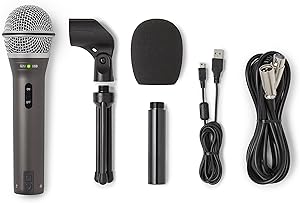
The Samson Q2U earns its place here because it’s both a capable starter mic and a future-proof one: its XLR output can connect directly into the Video Core’s combo jacks when you’re ready to upgrade. For under $70, you get a dynamic mic with USB and XLR dual output, zero-latency headphone monitoring, and a starter kit with all the accessories you need out of the box. The audio quality is good enough to launch a real podcast and be taken seriously — it’s not broadcast-grade, but it’s far from embarrassing.
Pros
USB and XLR in one mic for under $70
Works with the Video Core via XLR when you scale up
Comes with stand, windscreen, and cables
Cons
Sound quality is noticeably below premium dynamics
Build quality is plasticky compared to Shure or Rode
Needs close mic technique for best results
Who it’s for: Podcasters just starting out who want to budget for a production console down the road and need a capable mic in the meantime. The XLR output means nothing you buy today is wasted when you eventually add the Video Core to your setup.
Key Specs: RØDECaster Video Core at a Glance
| Feature | Specification |
|---|---|
| Price | $599 (preorder) |
| Video Inputs | 3 × HDMI Type-A, 1 × USB-C (UVC) |
| Video Output | 1 × configurable HDMI (program / preview / multiview) |
| Audio Inputs | 2 × Neutrik® combo XLR/TRS with Revolution Preamps™ |
| Audio Mixing | Up to 9 audio sources simultaneously |
| Audio Processing | APHEX® EQ, compressor, noise gate, de-esser, Aural Exciter™, Big Bottom™, Compellor™ |
| Scenes | 5 fully customizable |
| Streaming | Ethernet direct to YouTube, Twitch, and other RTMP platforms |
| Recording | External SSD via USB, ISO recording per source |
| NDI Support | 4 NDI inputs, 1 NDI output via Ethernet |
| Post-Production | EDL export for DaVinci Resolve |
| Control | Software via RØDECaster App (Mac/Windows) |
RØDECaster Video Core
All-in-One Console · 4 channels · ~$399
Our Rating: RØDECaster Video Core
Frequently Asked Questions
Can the RØDECaster Video Core replace OBS for streaming?
For most straightforward setups, yes. The Video Core streams directly to YouTube, Twitch, or any RTMP-compatible platform via Ethernet without a separate streaming computer or software. It handles scene switching, transitions, and graphic overlays natively. Complex overlays, alerts, or browser sources still work better in OBS — but the Video Core handles 90% of what most podcasters and streamers need.
How many mics can you run into the Video Core?
Two XLR/TRS combo inputs are built into the Video Core itself. By connecting a RØDECaster Pro II or RØDECaster Duo via RØDECaster Sync, you can expand to 4–6 XLR inputs and manage them all from a single software interface. This is the modular upgrade path RØDE designed for growing productions.
Does the Video Core work without a computer?
Yes and no. The RØDECaster App runs on Mac or Windows and provides the full switching and mixing interface. Basic recording and streaming can be configured and run without an active computer connection once set up, but initial configuration and scene building require the app. It is not designed for standalone use the way a hardware video switcher would be.
When will the RØDECaster Video Core ship?
As of April 2025, the Video Core is available for preorder at rode.com and Sweetwater. RØDE has not announced an exact ship date. Check the RØDE website for updated availability information before purchasing.
Can I use my existing cameras with the RØDECaster Video Core?
Any camera with HDMI output works with the three HDMI inputs. This includes DSLRs, mirrorless cameras, action cameras with HDMI out, and dedicated video cameras. PTZ cameras are supported via NDI over Ethernet. USB webcams work via the USB-C input, and iPhone cameras connect via the free RØDE Capture app.
Related reading: RØDECaster Video Core vs Pro II: Which All-in-One RØDE Console Is Right for You? · RØDECaster Duo vs Zoom PodTrak P4: Premium Quality vs. Multi-Host Value · USB vs. XLR Microphones: The Complete Guide to Choosing Your Podcast Setup
For more context on this rodecaster video core review, see our RØDECaster Video Core vs Pro II comparison and best podcast mixer guide. RØDE’s official specs are on the RØDE website.