
Video podcasting exploded faster than most solo creators could staff for it — and almost nobody has a camera operator. That’s the problem an AI camera for podcasting solves: a camera that pans, tilts, and zooms by itself to keep you framed as you lean back, gesture, or stand up, with no one behind it. For a one-person video podcast, the right AI auto-framing camera is the difference between looking locked-off and looking like a produced show.
This guide picks the best AI auto-framing cameras for video podcasting in 2026 — from the gimbal-tracking OBSBOT Tiny 2 to the consistency-first Insta360 Link 2 — and explains which fits a solo desk, a two-person table, or a budget multicam rig. One rule first, because we’re an audio site at heart: none of these cameras’ built-in mics are good enough for a real podcast. Use a proper microphone (see our XLR mic guide) and treat the camera as video-only.
Quick Verdict
OBSBOT Tiny 2 — Best overall. A motorized gimbal that physically pans and tilts to track you, a large 1/1.5″ sensor, and 4K HDR — the most produced look for a solo host.
Insta360 Link 2 — Best image consistency. A 2-axis gimbal with the steadiest AI tracking and the cleanest built-in audio of the group, in a compact body.
OBSBOT Meet 2 — Best budget. AI auto-framing (no gimbal) in an ultra-light, cheaper package — ideal as a second multicam angle.
Our Top Picks


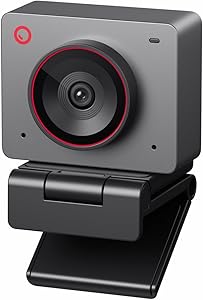
The Best AI Camera for Podcasting, Compared
| Feature | OBSBOT Tiny 2 | Insta360 Link 2 | OBSBOT Meet 2 |
|---|---|---|---|
| Tracking type | Motorized gimbal (pan/tilt) | 2-axis motorized gimbal | Digital AI framing |
| Sensor | 1/1.5″ | 1/2″ | 1/2″ |
| Max HDR | 4K30 HDR | 1080p30 HDR | 1080p-class |
| Gesture control | Yes | Yes | Yes |
| Weight | Standard | Compact | Ultra-light (~40g) |
| Best for | Moving solo host | Seated, set-and-forget | Budget / second angle |
| Use built-in mic? | No — use a real mic | No — use a real mic | No — use a real mic |
How to Build a Budget Multicam Podcast Setup
Multicam used to mean a director and a switcher. For a video podcast, it can now mean two AI cameras and software. A practical, affordable approach:
- Camera A (main): an OBSBOT Tiny 2 on the host, gimbal-tracking the primary speaker.
- Camera B (angle/wide): an OBSBOT Meet 2 as a second angle or a locked wide of the table.
- Switching: let software cut between angles — tools like Descript‘s automatic multicam (covered in our AI editor comparison) detect who’s talking and switch for you, no live director needed.
- Audio (the part that matters most): record voices on real microphones into your interface or console — a RØDECaster Video Core ties camera and audio together — and monitor on closed-back headphones. The cameras handle the picture; never let them handle the sound.
Frequently Asked Questions
What is the best AI camera for podcasting in 2026?
For most solo video podcasters, the OBSBOT Tiny 2 — its motorized gimbal physically pans and tilts to keep you framed without an operator, and its large 1/1.5″ sensor looks great in a home studio. If you want the steadiest tracking and the best built-in audio, the Insta360 Link 2 is the alternative, and the OBSBOT Meet 2 is the budget pick.
Do AI auto-framing cameras need a camera operator?
No — that’s the entire point. They use AI subject tracking (and, on the Tiny 2 and Link 2, a motorized gimbal) to follow you automatically, which is why they’ve become the default for solo and small-team video podcasts.
Should I use the camera’s built-in microphone for my podcast?
No. Even the best of these cameras’ mics is only good enough for video calls — not for a podcast people listen to. Record your audio on a dedicated microphone and treat the camera as video-only.
OBSBOT Tiny 2 or Insta360 Link 2 for a video podcast?
Both are motorized gimbals that physically track you. The Tiny 2 has a larger 1/1.5″ sensor and 4K HDR for the best image, especially in low light. The Insta360 Link 2 holds focus more consistently and has the cleaner built-in audio and software. Pick the Tiny 2 for image quality, the Link 2 for set-and-forget reliability.
Can I run a multicam video podcast without a switcher?
Yes. Pair two AI cameras with software that auto-switches angles based on who’s speaking — several editors, including Descript, now do this automatically — so you get multicam coverage without a live director or hardware switcher.
Are these cameras good in a dark home studio?
The OBSBOT Tiny 2’s larger 1/1.5″ sensor handles low light best of the three. All of them still benefit from a basic key light; AI framing keeps you centered, but it can’t manufacture light that isn’t there.