
Gear upgrades are one of the most common ways podcasters avoid dealing with the actual problems in their audio. A new microphone won’t fix a room that reflects sound. It won’t fix inconsistent mic technique. It won’t fix a gain level that’s too low or too high. The majority of podcasters who ask “should I upgrade my mic” would get better results by addressing those issues first — for free.
Quick Verdict
Worth upgrading from: Any condenser mic in an untreated room — switch to a dynamic mic that rejects off-axis noise by design, not by acoustic treatment.
Worth upgrading from: A USB mic in a permanent desk setup — move to XLR plus an interface for better preamp quality, future flexibility, and co-host support.
The question of when to upgrade podcast microphone is one every podcaster faces at some point.
Genuine upgrade targets: Rode PodMic ($99), Shure MV7+ ($269), Shure SM7B ($399).
Quick Wins: What You Need at a Glance
Fix the room before you fix the mic
A $400 microphone in a reflective room sounds worse than a $70 mic in a treated one. Acoustic panels, rugs, bookshelves, and soft furnishings reduce reflections. Address this first.
Upgrade from condenser to dynamic if you’re in an untreated space
Condenser mics pick up everything — room reflections, HVAC noise, keyboard clicks. Dynamic mics reject off-axis sound naturally. If your room is untreated, switching to a dynamic is the single highest-impact change you can make.
Upgrade from USB to XLR when your setup becomes permanent
USB mics are excellent for getting started. Once you have a fixed desk setup and want the flexibility to swap mics, add co-hosts, or improve preamp quality, XLR plus interface is the right move.
Full Breakdown: When to Upgrade Podcast Microphone
Best First Upgrade
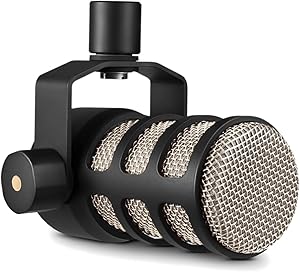
Rode PodMic
The right step up from a budget USB mic — broadcast XLR dynamic with an internal pop filter and significant improvement over entry-level setups
Pros
- Broadcast-tuned cardioid dynamic — rejects room reflections, background noise, and off-axis sound without acoustic treatment
- Internal pop filter eliminates plosive management entirely — no positioning an external filter, no bracket cluttering the desk
- Standard output level works cleanly on any interface including budget options — no Cloudlifter or high-gain preamp required
- XLR output with a metal yoke mount — compatible with every boom arm and interface on the market, no adapters needed
- Substantial jump in audio quality over USB microphones in the $50–$100 range, audible without trained ears
Cons
- Requires an audio interface — adds $100–$120 to the total setup cost for anyone coming from a direct USB mic
- No onboard monitoring, gain control, or DSP — all processing happens at the interface level
Bottom line: The PodMic is the correct first XLR upgrade for most podcasters moving away from USB. Paired with a Focusrite Scarlett Solo ($119), the total setup cost is around $220 and the audio improvement over a budget USB mic is immediate and clear. For anyone in a home environment with a permanent desk setup, this is the right move — and one of the clearest signs of when to upgrade podcast microphone gear in a permanent setup.
Best Mid-Tier Upgrade

Shure MV7+
USB-C and XLR output with onboard DSP — broadcast-quality sound with the simplicity of USB and the flexibility of XLR
Pros
If you’re still unsure when to upgrade podcast microphone equipment, run the checklist above before spending anything.
- Dual USB-C and XLR output — works as a USB mic today and converts to a full XLR setup later without buying a new mic
- Onboard DSP with voice isolation technology — reduces background noise at the hardware level before the signal reaches your software
- Built-in headphone monitoring with zero-latency direct monitoring through the 3.5mm jack on the mic body
- LED touch panel for gain and mix control directly on the mic — intuitive control without opening software
- Shure build quality at a mid-tier price — significantly more durable and polished than budget alternatives in the $150–$200 range
Cons
- At $269, it sits above the PodMic plus interface combo in total cost — the sound improvement is real but incremental rather than transformative
- The onboard DSP processing is effective but adds a layer of signal handling that some podcasters prefer to manage in post rather than at source
Bottom line: The MV7+ is the right choice for podcasters who want USB simplicity with XLR-grade results, or who want to future-proof a setup without committing to a full interface immediately. The dual output means it works in any configuration. The onboard DSP genuinely reduces background noise rather than just compressing everything uniformly.
Best Premium Upgrade

Shure SM7B
The broadcast industry standard — wide frequency range, exceptional rejection, the ceiling of the dynamic mic category for podcasting
Pros
- Wide, flat frequency response with a smooth presence peak — captures voice with warmth and clarity that holds up in professional broadcast environments
- Air suspension shock mount built into the body — isolates against desk vibration and handling noise without a separate accessory
- Switchable frequency response (flat and bass roll-off) and presence boost — tonal control on the mic body without reaching for EQ
- Industry-recognised on-camera mic — for video podcasters, the SM7B is a visible quality signal that carries real production value
- Detachable windscreen handles close-mic plosives without an external pop filter cluttering the frame
Cons
- Very low output sensitivity — requires a Cloudlifter ($150) or high-gain interface to drive cleanly; the total setup cost is $550+ before the interface
- The performance gap over a well-recorded PodMic or MV7+ is real but small for audio-only podcasts — the investment is most justified when the mic appears on camera
Bottom line: The SM7B is genuinely the right upgrade when the microphone is confirmed to be the bottleneck — not the room, not the interface, not mic technique. If you’re producing professional broadcast content, recording video where the mic appears on camera, or have already addressed every other variable, the SM7B is the correct endpoint. For audio-only podcasts in home environments, the PodMic or MV7+ close the gap at a fraction of the cost.
Signs Your Microphone Is Actually the Problem
The honest breakdown
Your mic is the problem if: You’ve treated the room and the audio still sounds thin or harsh. You’re using a condenser in an untreated room and have already tried repositioning it. Listeners have specifically commented on mic quality — not room sound or reverb. You’re comparing your audio directly to professional broadcast shows and the gap is clearly in the source capture.
Your mic is not the problem if: Your room is untreated and you haven’t addressed reflections. Your gain is set incorrectly — too low produces noise, too high produces distortion. Your mic technique is inconsistent — varying distance, off-axis placement, or proximity to hard surfaces. You’re using a USB mic and haven’t experimented with closer placement and a foam windscreen.
The correct order of fixes: Room acoustics first. Gain staging second. Mic technique third. Mic upgrade last — and only if everything else is already optimised.
Frequently Asked Questions
How do I know if my microphone is the problem?
Record a test clip and listen back on headphones. If the audio sounds reverberant or roomy, the issue is your recording environment — not the mic. If the audio sounds clean but thin, harsh, or lacking presence, the mic’s frequency response may be a limiting factor. The clearest test: record in a closet full of clothes, which acts as a dead booth. If the audio dramatically improves, your mic is fine and your room is the problem.
Is the Shure SM7B worth it for a podcast?
It depends on what you’re upgrading from and why. If you’re moving from a budget USB mic and your room is untreated, the SM7B will not solve your audio problems — the room will still sound like a room. If you’ve already got a solid setup, treated your space, and the mic is genuinely the last variable, the SM7B is a legitimate ceiling-level upgrade. Factor in the real cost: SM7B ($399) + Cloudlifter ($150) + Scarlett Solo ($119) = approximately $668 minimum.
What’s the difference between the MV7 and MV7+?
The MV7+ is Shure’s updated version with USB-C (replacing micro-USB on the original MV7), improved onboard DSP with voice isolation technology, a touch LED panel for direct gain control, and better noise floor performance. The MV7+ also supports XLR output in addition to USB, which the original MV7 also had. If you’re buying new, the MV7+ is the current model and the better choice at a similar price point.
Should I upgrade my mic or my interface first?
Interface first, if your current interface is genuinely poor quality — audible hiss, clipping at normal gain levels, or inadequate preamp output. A better interface improves every mic you connect to it. If your interface is already solid (Focusrite Scarlett, MOTU M2, or equivalent), upgrade the mic. If you’re on a USB mic with no interface, moving to XLR plus a quality interface is a combined upgrade that addresses both simultaneously.
At what point does microphone quality stop mattering?
For audio-only podcasts, listeners on earbuds or consumer speakers cannot reliably distinguish between a well-recorded Rode PodMic and a Shure SM7B in a finished production. The point of diminishing returns is reached quickly — roughly at the Rode PodMic level for most use cases. Beyond that, quality differences are audible in controlled A/B tests but not in normal listening conditions. Mic upgrades above this threshold are justified by on-camera visibility, professional broadcast requirements, or personal preference — not listener-audible quality improvements.
Related Guides
- Shure SM7B Review: Is It Worth It for Podcasting?
- Best Podcast Mic Under $200: The Best-Sounding Mics You Can Actually Afford
- Best XLR Microphone for Podcasting: Top Picks for Every Budget
- USB vs XLR Microphones: Which One Do You Actually Need?
Browse all guides in our Microphones Hub.
Related reading: Shure MV7+ Review: The Upgraded USB/XLR Podcast Mic That Gets Everything Right · USB vs. XLR Microphones: The Complete Guide to Choosing Your Podcast Setup · Best Podcast Microphone Under $100: Real Picks for Tight Budgets