
Recording a podcast by yourself is relatively simple: one mic, one interface, one signal chain. Recording with a second person in the same room doubles every decision you need to make and introduces a set of problems that solo setup guides don’t address. Two voices in the same room means managing two signal chains, preventing bleed between microphones, and making sure both speakers sound consistent in the final edit.
Quick Verdict
Recording in-person: You need two dedicated microphones, a two-input audio interface, and closed-back headphones for each person. Skipping any of these creates problems that cannot be fixed in post.
Recording remotely: You don’t need any of this. If your co-host or guest is in a different location, each person records on their own device and a platform like Riverside.fm handles track separation automatically.
Quick Picks
Best two-person mic on a budget: Samson Q2U x2
Best two-input interface: Focusrite Scarlett 2i2
Best monitoring headphones: Sony MDR-7506
Best mic upgrade from the Q2U: Rode PodMic x2
How to Record a Podcast with Two People: Full Breakdown
Best Budget Two-Person Setup
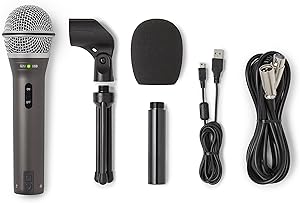
Samson Q2U
USB/XLR dynamic under $70 — the practical two-person starting point
Pros
- Under $70 each — two mics for under $140
- Dynamic capsule rejects off-axis sound including the other speaker
- USB and XLR outputs — flexible signal chain options
- Matching mics make post-production simpler
- Widely available
Cons
- Sounds thin compared to higher-end dynamics
- Needs a boom arm for each speaker — included desk stand positions mics poorly
- USB audio maxes at 16-bit/44.1kHz
Bottom line: The clear starting point for any two-person in-person podcast setup. Two Q2U units for under $140 gives you matched dynamic mics with USB and XLR flexibility — and the dynamic capsule naturally rejects the other speaker’s voice.
Best Two-Input Interface

Focusrite Scarlett 2i2
Two simultaneous XLR inputs — the only way to record both mics at once
Pros
- Two simultaneous XLR inputs — required for two-mic recording to separate tracks
- Independent gain control per channel — set each mic level separately
- Identical preamp quality to higher-priced Scarlett models
- Powers over USB — no external power supply needed
- Includes software bundle
Cons
- $50 more than the Scarlett Solo, which cannot record two mics simultaneously
- Does not include microphones
Bottom line: The minimum viable interface for any two-person in-person setup. The Scarlett Solo has one input — it cannot record two mics at the same time. If you’re recording two people in the same room, the 2i2 is not optional.
Best Monitoring Headphones

Sony MDR-7506
The standard monitoring headphone — flat, closed-back, and bleed-proof
Pros
- Flat frequency response — accurate for monitoring and mixing decisions
- Closed-back design completely prevents speaker bleed into open mics
- Comfortable for full recording sessions
- Connects from the interface headphone output or a headphone splitter
- Widely available with a long track record in professional use
Cons
- Coiled cable is inconvenient for desktop use
- Not as comfortable as the Beyerdynamic DT 770 Pro over very long sessions
- Highs can become fatiguing at loud volumes
Bottom line: One pair per person is not optional in a two-mic setup — monitoring through speakers bleeds directly into open mics. The MDR-7506 is the standard recommendation for flat monitoring, bleed prevention, and comfort across a full recording session.
Best Upgrade Microphone
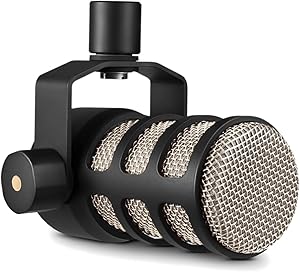
Rode PodMic
Better sound quality and tighter bleed rejection — the right step up from the Q2U
Pros
- Tight cardioid polar pattern — built for voice in reflective rooms
- Internal pop filter lets you get close without plosive issues
- Built-in high-pass filter rolls off low-end room noise
- Warm, broadcast-style voicing especially good for deeper voices
- Solid metal build — stays put on a boom arm
Cons
- XLR only — requires an interface, no USB option
- Needs a quality preamp — pairs best with the Focusrite Scarlett 2i2
- At $100-$130 each, you’re committing to an XLR-only ecosystem
Bottom line: The right mic upgrade once you’ve confirmed the two-person format works for your podcast. Two PodMics with a Scarlett 2i2 is the $400-$500 setup that most dedicated two-person podcasts end up on.
| Component | Our Pick | Price | Our Score |
|---|---|---|---|
| Microphones (x2) | Samson Q2U | ~$70 each | 8.9 |
| Interface | Focusrite Scarlett 2i2 | $169 | 9.3 |
| Headphones (x2) | Sony MDR-7506 | ~$90 each | 9.0 |
| Upgrade Mics (x2) | Rode PodMic | ~$100 each | 9.3 |
Complete Setup Options by Budget
The two-person setup scales cleanly across three price points. Each level solves the core problem — two separate recorded tracks — with increasing audio quality and convenience.
| Budget | Setup | Notes |
|---|---|---|
| Under $200 | Two Q2U in USB mode | No interface needed. Each mic plugs into its own computer. More complicated to sync in post-production. Good enough to validate the format. |
| $300-$400 | Two Q2U + Scarlett 2i2 + one headphone pair with splitter | Both mics record to separate tracks in one DAW session. The recommended starting point for a permanent two-person setup. |
| $400-$600 | Two Rode PodMic + Scarlett 2i2 + two headphone pairs | Better sound quality and tighter bleed rejection. The right level of investment once you’ve confirmed the format works for your podcast. |
Remote vs In-Person: Which Setup You Actually Need
If your co-host or guest is not physically in the same room as you, you don’t need any of the above. Remote two-person podcast recording uses each person’s own microphone in their own location, plus a recording platform like Riverside.fm, Zencastr, or SquadCast that captures separate tracks remotely. No shared interface — each person manages their own signal chain, and the platform handles track separation automatically.
The in-person setup described in this guide is only for recording two people in the same physical room. If you’re unsure which applies to your situation: if your guest joins via video call or phone, you’re recording remotely and this guide doesn’t apply.
Mic Technique for Two-Person Setups
With two mics in the same room, everything that affects one mic affects both. A mic positioned poorly in a solo setup produces annoying audio. In a two-person setup, it adds bleed to the other person’s track that is very difficult to remove in post-production.
Two-Person Mic Technique Rules
Position each mic 3-6 inches from the speaker — staying on-axis is your primary bleed-reduction tool.
Point the rear null toward the other speaker — cardioid mics reject sound best directly behind the capsule.
When figuring out how to record a podcast with two people, the interface choice is the most critical decision you’ll make.
Use dynamic mics, not condensers — dynamic capsules are less sensitive and naturally reject more off-axis room sound.
Keep the speakers as far apart as space allows — more distance between speakers means less bleed between mics.
Use a boom arm, not a desk stand — boom arms decouple the mic from the desk and let you maintain correct mic distance without hunching.
Frequently Asked Questions
How to Record a Podcast with Two People: Can I record two people with one microphone?
Technically yes, but the results are almost always poor. The person further from the mic sounds distant and echoey, volume levels are uneven, and you cannot adjust one voice in post without affecting the other. Two mics is the minimum viable setup for two-person recording.
Do I need two computers to record two people?
No. With a two-input interface like the Scarlett 2i2, both microphones feed into one computer and record to separate tracks in one DAW session. You only need two devices if you’re using USB mics in USB mode without an interface — and even then, syncing in post-production is more work.
What software should I use for two-person in-person recording?
Audacity (free), GarageBand (free, Mac only), or Adobe Audition all work well. The key is setting each microphone to record on its own track. For remote recording, Riverside.fm, Zencastr, or SquadCast handle multi-track capture automatically without requiring a shared interface.
How do I prevent one mic from picking up the other person’s voice?
Use dynamic microphones instead of condensers, position each mic 3-6 inches from its speaker, point the rear null of each mic toward the other speaker, and keep both speakers as far apart as the space allows. Mic placement does most of the work — software can reduce residual bleed in post but cannot fix a fundamentally bad setup.
Do both people need headphones?
Yes, if you’re monitoring through speakers. Audio from room monitors feeds back into open microphones. With two mics running in the same room, each mic picks up not just its speaker’s voice but also audio coming through the monitors. Closed-back headphones for each person prevent this completely and let each person monitor their own mic level in real time.
Related Guides
- Best Complete Podcast Setup Under $300: Everything You Need to Start Recording Today
- Rodecaster Pro II vs Zoom PodTrak P4: Which Podcast Mixer Is Right for You?
- Best Podcast Headphones for Monitoring: What Pro Studios Actually Use
- Audacity vs GarageBand vs Reaper: Best Free Podcast Editing Software
Browse all guides in our Complete Setups Hub.
Knowing how to record a podcast with two people properly means your show will sound professional from day one. Related reading: RØDECaster Duo vs Zoom PodTrak P4: Premium Quality vs. Multi-Host Value · USB vs. XLR Microphones: The Complete Guide to Choosing Your Podcast Setup · Best Podcast Microphone Under $100: Real Picks for Tight Budgets