
Most podcast gear guides either point you at a single microphone or jump straight to $500+ full-studio setups. There’s a useful middle: a complete, ready-to-record podcast setup that doesn’t require a second purchase to actually work. Under $300, you can get a dynamic microphone, an audio interface, a boom arm, and closed-back headphones — every component needed to start recording clean audio today.
Quick Verdict
The complete setup: Samson Q2U into a Focusrite Scarlett Solo, mounted on a NEEWER NW-35 boom arm, monitored through Sony MDR-7506 headphones. Total cost sits right at $297 — every piece earns its place.
Can’t buy everything at once? Start with the Q2U in USB mode ($70). Add the interface, boom arm, and headphones in that order as budget allows. The Q2U works standalone from day one.
Quick Picks
Best mic for this budget: Samson Q2U — USB and XLR in one, under $70
Best interface for solo podcasters: Focusrite Scarlett Solo — same preamp as the 2i2, $50 cheaper
Best budget boom arm: NEEWER NW-35 — desk clamp, full reach, under $20
Best monitoring headphones: Sony MDR-7506 — flat response, closed-back, industry standard
Full Breakdown
Microphone
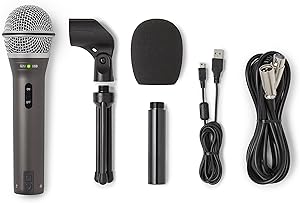
Samson Q2U
USB/XLR dynamic mic under $70 — the anchor of this setup
Pros
- Both USB and XLR outputs — plug straight in via USB or use XLR through the Scarlett Solo
- Dynamic capsule naturally rejects background noise, HVAC, and room reflections
- Built-in headphone jack with zero-latency monitoring — useful even without the interface
- Under $70 and widely available — the best value dynamic at this price
Cons
- Slightly thin in the low-mids compared to higher-end dynamics like the Rode PodMic
- Included desk stand is poor — the boom arm in this setup replaces it immediately
Bottom line: The Q2U anchors this setup because it works day one in USB mode, then upgrades to XLR through the Scarlett Solo without any hardware change. It’s the most flexible entry-level dynamic microphone available.
Audio Interface

Focusrite Scarlett Solo
Single XLR input, clean preamp, USB bus power — the right interface for solo podcasters
Pros
- Identical preamp quality to the Scarlett 2i2 — you’re only paying for one input instead of two
- Air mode adds high-frequency presence that suits spoken-word recording
- USB bus powered — no external power supply required
- Headphone output connects directly to the MDR-7506 for monitoring
- Includes Ableton Live Lite and a plug-in bundle
Cons
- One XLR input — cannot record two microphones simultaneously
- No direct monitoring mix control (monitoring is through the headphone output only)
Bottom line: The Scarlett Solo is the right interface for any solo podcaster moving from USB to XLR. At $119 it delivers the same audio quality as the $169 Scarlett 2i2 — the only difference is the second input, which a solo podcaster doesn’t need.
Boom Arm

NEEWER NW-35
Scissor boom arm under $20 — positions the mic correctly without inflating the budget
Pros
- Desk clamp mount — no floor stand, no extra footprint
- Full 360-degree rotation with adjustable tension — holds position reliably under normal use
- Cable tie slots built in for basic cable management
- Under $20 — frees up $60+ in the budget for the headphones or interface
- Amazon’s Choice with 24,000+ ratings — proven reliability at this price point
Cons
- Springs lose tension over time — heavier mics above 500g will droop eventually
- No internal cable routing — cable runs externally along the arm
- Clamp can mark softer desk surfaces without a protective pad
Bottom line: The NEEWER NW-35 exists to get the mic off the desk and into the correct position without adding $80–$150 to the budget. It does that job well. The Q2U is light enough that spring droop isn’t a real problem in normal desk use.
Headphones

Sony MDR-7506
The industry-standard monitoring headphone — flat, closed-back, and built to last
Pros
- Flat frequency response — what you hear is what your listeners will hear
- Closed-back design prevents headphone bleed into the open microphone
- Connects directly to the Scarlett Solo headphone output
- Foldable design with a carrying pouch — practical for any desk setup
- Used in professional broadcast and recording environments worldwide for decades
Cons
- Coiled cable is long and can be awkward at a standard desk distance
- Highs become fatiguing at high volume over long sessions
Bottom line: The MDR-7506 is the most affordable point at which you get genuinely flat monitoring. Cheaper headphones color the sound in ways that lead to bad mixing decisions. At $90 this is not a place to cut corners.
| Component | Our Pick | Price | Our Score |
|---|---|---|---|
| Microphone | Samson Q2U | ~$70 | 8.9 |
| Interface | Focusrite Scarlett Solo | ~$119 | 9.1 |
| Boom Arm | NEEWER NW-35 | ~$18 | 8.3 |
| Headphones | Sony MDR-7506 | ~$90 | 9.0 |
What to Buy First If You Can’t Afford Everything at Once
The four-component setup costs $297 together. If that’s not possible in one purchase, here’s the order that makes the most sense:
Priority Order
1. Samson Q2U ($70) — start here. In USB mode it’s a complete recording setup on its own. Plug into your computer, open Audacity or GarageBand, and you’re recording. No other hardware needed.
2. Focusrite Scarlett Solo ($119) — add this second. Switching the Q2U from USB to XLR mode through the Solo gives you a cleaner signal path and better monitoring through the headphone output.
3. NEEWER NW-35 ($18) — add this as soon as possible. The included desk stand positions the mic too low and picks up desk vibration. The boom arm is cheap enough that it should follow the mic purchase quickly.
4. Sony MDR-7506 ($90) — add before you start seriously editing. You can record without them, but you need accurate headphones before you try to mix or judge your audio quality.
Why This Setup Works
Every component earns its place. The Q2U’s dynamic capsule handles untreated rooms without picking up echo. The Scarlett Solo’s preamp is clean enough that it won’t be the limiting factor in your audio chain. The NEEWER arm gets the mic to mouth level without costing $100. The MDR-7506 gives you accurate monitoring so you can hear what’s actually in your recordings.
What this setup doesn’t do: it won’t fix a bad room, it won’t work for recording two people simultaneously, and the boom arm won’t last forever. But for a solo podcaster starting out, it’s the most complete and honest setup available under $300.
Frequently Asked Questions
Can I start with just the microphone and add the rest later?
Yes. The Samson Q2U in USB mode is a functional recording setup on its own. Plug it into your computer, set it as your input device in your recording software, and you’re recording. Add the Scarlett Solo when you want to go XLR, the boom arm as soon as you can, and the headphones before you start mixing seriously.
Do I need a pop filter with this setup?
The Q2U doesn’t have a built-in pop filter, so a slight off-axis angle is helpful if you’re prone to hard P and B sounds. Position the mic 10–15 degrees off-axis from your mouth rather than pointing it directly at your lips. A basic foam windscreen ($5–10) also works and is the cheapest fix.
What recording software should I use with this setup?
Audacity is free, works on Mac and Windows, and handles everything a podcast needs — multi-track recording, noise reduction, EQ, compression, and export. GarageBand is free on Mac and slightly easier to use. The Scarlett Solo also includes Ableton Live Lite if you want a more capable DAW. Any of these work cleanly with this hardware.
Is the NEEWER NW-35 good enough or should I spend more on a boom arm?
For the Q2U, yes. The Q2U weighs about 320g, well within the arm’s rated capacity. The main limitation of budget boom arms is spring fatigue over time with heavier mics. If you upgrade to a heavier microphone like the Rode PodMic or SM7B later, upgrade the arm at the same time. For this setup, the NW-35 does exactly what it needs to.
Related Guides
- Best Complete Podcast Setup Under $200: The Gear Ladder’s Missing Rung
- Best Complete Podcast Setup Under $500: The Step-Up Rig That Lasts
- Best Podcast Starter Kit: Complete Bundles That Actually Work
- Focusrite Scarlett Solo Review: The Interface That Starts It All
Browse all guides in our Complete Setups Hub.