
The $300 setup gets you recording. The $500 setup gets you a rig you won’t need to replace. At this price point you can afford a broadcast-quality dynamic microphone, a two-input interface that future-proofs for a co-host, a premium boom arm with internal cable routing, and the industry-standard monitoring headphones — all from brands with proven track records.
Quick Verdict
The complete setup: Rode PodMic into a Focusrite Scarlett 2i2, mounted on a Rode PSA1+ boom arm, monitored through Sony MDR-7506 headphones. Total comes to $484 — a complete, professional-grade rig that working podcasters actually use.
Upgrading from the $300 setup? The PodMic is a genuine step up in microphone quality. The 2i2 adds a second input for future co-hosting. The PSA1+ is the last boom arm you’ll ever need to buy.
Quick Picks
Best mic for this budget: Rode PodMic — broadcast capsule, internal pop filter, XLR-only precision
Best interface for growth: Focusrite Scarlett 2i2 — two inputs, Air mode, built for the long term
Best premium boom arm: Rode PSA1+ — internal cable routing, heavy-duty spring, clean on camera
Best monitoring headphones: Sony MDR-7506 — flat response, closed-back, industry standard
Full Breakdown
Microphone
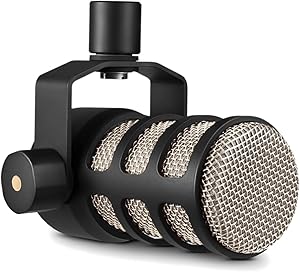
Rode PodMic
Broadcast-grade XLR dynamic mic at $99 — a genuine step up from budget dynamics
Pros
- Broadcast-grade capsule with a tight cardioid pattern — rejects room noise and background sound
- Internal pop filter built into the housing — no external filter required
- Flat-to-slightly-warm frequency response designed specifically for spoken word
- XLR-only design forces a clean signal path through the Scarlett 2i2
- All-metal construction with a built-in swivel mount — genuinely road-worthy build quality
Cons
- XLR-only — requires an interface, cannot plug directly into a computer
- Slightly heavier than budget dynamics — the PSA1+ in this setup handles it without issue
Bottom line: The PodMic is the reason the $500 setup sounds noticeably better than the $300 setup. The capsule, polar pattern, and frequency response are tuned for spoken word in a way that entry-level dynamics aren’t. It needs less EQ, handles proximity effect better, and sounds more professional out of the box.
Audio Interface

Focusrite Scarlett 2i2
Two-input XLR interface at $169 — the same preamp as the Solo, with room to grow
Pros
- Two XLR inputs — add a co-host without replacing the interface
- Air mode engages a high-frequency lift that adds presence and clarity to the PodMic
- Identical preamp quality to the Scarlett Solo — you’re paying for the second input, not a better preamp
- USB bus powered — no wall adapter required
- Headphone output with independent volume control for real-time monitoring
Cons
- $50 more than the Solo — only worth it if you need or plan to need two inputs
- Slightly larger footprint than the Solo on your desk
Bottom line: If you’re a solo podcaster who will never record with a co-host, the Scarlett Solo saves you $50 with identical audio quality. The 2i2 earns its place in this setup because $500 budgets tend to signal serious intent — and a second input is worth the $50 if you ever bring a guest in-person.
Boom Arm

Rode PSA1+
Professional studio arm at $126 — internal cable routing, heavy-duty spring, built for daily use
Pros
- Internal cable routing keeps your desk completely free of visible mic cable
- Handles microphones up to 1.5kg — the PodMic at 937g is well within its rated capacity
- Spring-damped movement — repositions smoothly with no bounce or wobble
- Desk clamp and desk insert both included — fits virtually any desk thickness
- Looks clean on camera — a meaningful advantage if video is part of your podcast
Cons
- $126 is a significant spend for a boom arm — budget setups don’t justify this cost
- Larger footprint than scissor-style arms when fully extended
Bottom line: The PSA1+ is the boom arm that podcast professionals actually use. The internal cable routing alone justifies the price over budget arms — it’s the detail that separates a clean studio setup from a cable-tangled desk. At $126, it’s the last boom arm you’ll ever need to buy.
Headphones

Sony MDR-7506
The industry-standard monitoring headphone — flat, closed-back, and built to last
Pros
- Flat frequency response — what you hear is what your listeners will hear
- Closed-back design prevents headphone bleed into the open microphone
- Connects directly to the Scarlett 2i2 headphone output for zero-latency monitoring
- Foldable design with carrying pouch — compact storage for any setup
- Trusted in professional broadcast and recording environments worldwide for decades
Cons
- Coiled cable is long and can be awkward at a standard desk distance
- Highs can become fatiguing at high volume over long editing sessions
Bottom line: The MDR-7506 appears in both the $300 and $500 setup because it’s already the right answer at $90. There’s no version of this headphone recommendation that changes — it’s the most affordable point at which you get genuinely accurate monitoring for podcast production.
| Component | Our Pick | Price | Our Score |
|---|---|---|---|
| Microphone | Rode PodMic | ~$99 | 9.2 |
| Interface | Focusrite Scarlett 2i2 | ~$169 | 9.1 |
| Boom Arm | Rode PSA1+ | ~$126 | 8.8 |
| Headphones | Sony MDR-7506 | ~$90 | 9.0 |
$500 vs $300: What You Actually Get for the Extra $200
The $300 setup works. The $500 setup sounds noticeably better and gives you more flexibility. Here’s exactly what the extra spend buys:
Where the $200 Goes
Better microphone ($30 upgrade): The PodMic’s frequency response and polar pattern are noticeably superior to the Q2U. It handles proximity effect better, needs less EQ, and captures a more professional sound from the first recording.
Better interface ($50 upgrade): The Scarlett 2i2 adds Air mode, a second XLR input for a co-host, and slightly more headroom than the Solo. The preamps are the same quality — the upgrade is flexibility.
Better boom arm ($108 upgrade): The PSA1+ routes cables internally and holds heavier mics reliably for years. It also looks completely clean on camera — a significant difference if you record video alongside audio.
What doesn’t change: The headphones. The MDR-7506 is already the right choice at $300, and that answer doesn’t change at $500.
Why This Setup Works
Every component in this list earns its place. The PodMic’s dynamic capsule handles untreated rooms without picking up echo or room reverb. The Scarlett 2i2’s preamps are clean enough that they won’t be the limiting factor in your audio chain — ever. The PSA1+ keeps cables off the desk and positions the mic precisely where you need it, every time. The MDR-7506 gives you accurate monitoring so you can hear exactly what’s in your recordings.
What this setup doesn’t do: it won’t fix a seriously bad room, and recording two people simultaneously on completely separate tracks requires software configuration. But for a serious solo podcaster who wants a complete, professional setup they won’t need to replace for years, this is it.
Frequently Asked Questions
Is the Rode PodMic worth the upgrade over the Samson Q2U?
Yes, if you’re already buying an audio interface. The PodMic is XLR-only, so it requires the Scarlett 2i2 or Solo — which you’re already buying in this setup. The capsule quality, polar pattern tightness, and built-in pop filter make a real difference in audio quality. If you’re spending $500 on a complete setup, the PodMic is the right mic.
Do I need the Scarlett 2i2 or will the Solo work?
For a solo podcaster, the Solo works just as well and costs $50 less. The preamp quality is identical — the only difference is the second XLR input on the 2i2. If you ever plan to record with a co-host in person, the 2i2 is worth the extra $50. If you’re confident you’ll always record solo, save the money and get the Solo.
What’s the difference between the PSA1 and PSA1+?
The PSA1+ has spring damping that prevents the arm from springing up when released — it stays exactly where you put it. It also has a slightly higher weight capacity and cleaner internal cable routing than the original PSA1. At $126 versus roughly $100 for the PSA1, the PSA1+ is worth the difference for the spring damping alone.
Can I add a second mic to this setup later?
Yes — that’s exactly why the Scarlett 2i2 is in this setup. The second XLR input handles a second microphone directly. You’d need a second microphone, a second XLR cable, and a boom arm for the second mic. The 2i2 records both inputs to a stereo file by default; for completely separate tracks you’ll want to configure your DAW accordingly.
Related Guides
- Best Complete Podcast Setup Under $300: Everything You Need to Start Recording Today
- Complete Podcast Studio Setup for Beginners: Gear, Layout, and First Steps
- Shure SM7B Review: Is It Worth It for Podcasting?
- Focusrite Scarlett 2i2 Review: Still the Best Interface?
Browse all guides in our Complete Setups Hub.